The Screenshot That Looked Like Proof
Screenshot verification helps trace an image to its source and recover missing context, so you can describe what it supports before sharing it.
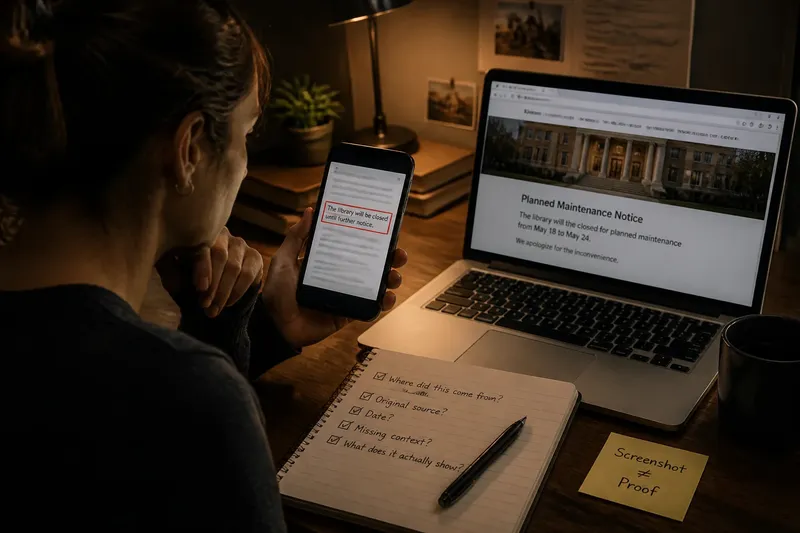
A screenshot lands in a group chat: a public notice with one sentence boxed in red. The design looks official, and the wording sounds final. Screenshot verification begins with a simple question: where did this image come from, and what falls outside its edges?
What can screenshot verification establish?
A screenshot shows what appeared on a particular display when someone captured it. On its own, it does not identify who created the underlying material, show whether the image is complete, or establish that the text appeared in the setting the sender claims.
That does not make every screenshot useless. It can preserve a useful record, especially when a page changes or disappears. But it is one piece of evidence, not a self-authenticating document. Think of it like a loose puzzle piece: you can see its shape, but not where it belongs in the larger picture.
Keep the claims distinct. “This image contains these words” differs from “this agency issued these words,” which differs again from “the words are still current.” Each claim needs evidence suited to it.
Where did the screenshot first appear?
Start with the person or account that sent it. Ask whether they link to an original page, document, or post. A repost may name a source, but a chain of reposts does not establish where the image began. Follow links back rather than treating repetition as confirmation.
Look for clues that could help locate the original: a publication name, account handle, document heading, date, distinctive phrase, or visible web address. Search a distinctive line in quotation marks, or try a reverse-image search if the screenshot includes a recognizable page or graphic. These methods can point to earlier appearances; they do not authenticate the image by themselves.
If the screenshot claims to show a notice from a school, city office, or company, look for the notice on the organization’s own website or official channel. Compare the wording with any available original. If you cannot locate one, say the source is unconfirmed instead of filling the gap with confidence.
What might the crop leave out?
A crop can remove a date, heading, reply, correction, or sentence that limits a claim. It can also hide whether the image came from a news article, a comment, a draft, or a parody account. The crop may be innocent, but what it removes can still affect how the words are understood.
Ask what a reader would need in order to interpret the highlighted text fairly. For a document, that might be its title and neighboring paragraphs. For a social post, it could be the account name, timestamp, and surrounding exchange. For a chart, look for the caption and labels as well as the most striking section.
Say you receive an invented screenshot that appears to show a library closing notice. It leaves out the date and the line above the highlighted sentence, which says the closure is only for a planned maintenance window. You find the full notice on the library’s official page and compare the wording. The result supports a narrower description—a temporary closure—rather than a permanent shutdown. If you cannot find the full notice, neither interpretation is established by the crop alone.
Can the surrounding material clarify the claim?
Look for the page or post around the image, not merely a larger version of the same crop. The source may include a correction, publication date, link to a primary document, or note explaining that the text is an excerpt. Any of those details could change what the screenshot supports.
For a captured news page, compare the visible headline and text with the article on the publisher’s site. Check for an update or correction. For a captured social post, look for the original post and any attached thread or follow-up. A screenshot of a reply cannot show which question it answered if that question is missing.
If the screenshot shows a document, look for it in the issuing organization’s archive or on its website. A PDF may preserve a title, issuing body, and surrounding sections that a crop hides. Logos and formatting can be copied, so the document’s traceable origin matters more than a polished appearance.
How should you describe what remains uncertain?
Choose wording that matches what you could verify. “The screenshot appears to show” is narrower than “the organization announced.” “I found the same wording on the organization’s page” describes a checkable result; “this proves the claim” may go beyond what the image supports.
Keep a short note of what you checked: who shared the image, which original source you found, and what context remains missing. If you share the screenshot, link to the full source when possible and avoid removing context that helps others assess it.
Sometimes the image is all you have. State that limit plainly. An unresolved origin is not confirmation, and official-looking design cannot take the place of a traceable source.
What should you check before sharing a screenshot?
- Check the sender and any link to an earlier post; if the trail ends at reposts, describe the origin as unknown and avoid presenting it as original.
- Check for a distinctive phrase, visible web address, or document title; if a matching original appears, compare its wording, and if none appears, leave the source unconfirmed.
- Check whether the date is visible; if it is, compare it with the claim’s timing, and if it is missing, avoid describing the notice as current.
- Check for a heading and neighboring text; if they qualify the highlighted sentence, include that qualification, and if they are unavailable, keep your description limited to the visible words.
- Check the account name and surrounding conversation on a social-post screenshot; if they clarify who said what, include that context, and if they are missing, do not attribute the words to a specific account.
- Check for a correction, update, or linked primary document; if one changes the meaning, use the corrected or fuller account, and if none can be located, state that the image alone does not resolve the claim.
- Check whether the image supports the exact statement you plan to share; if it supports only a narrower point, use that wording, and if the connection is unclear, hold the stronger claim back.
Who first shared the image?
Identify the person or account that sent it and look for a link to the original. If the trail ends at reposts, describe the origin as unknown.
Can you locate the original material?
Search a distinctive phrase or visit the named organization’s own site. If you find a matching source, compare its text rather than relying on the screenshot’s appearance.
What is missing beyond the crop?
Look for a date, heading, neighboring text, caption, or conversation that could change the meaning. If that context is unavailable, keep the claim narrow.
Does the image support the exact claim being shared?
Separate what the image visibly shows from what someone says it proves. Link to the original when available and describe any remaining uncertainty so a compelling crop does not become the whole record.
Good screenshot verification does not require you to settle every question before speaking. It does require you to keep the wording close to the evidence: name what the image shows, link what you could trace, and mark what remains unknown.